
Latest News

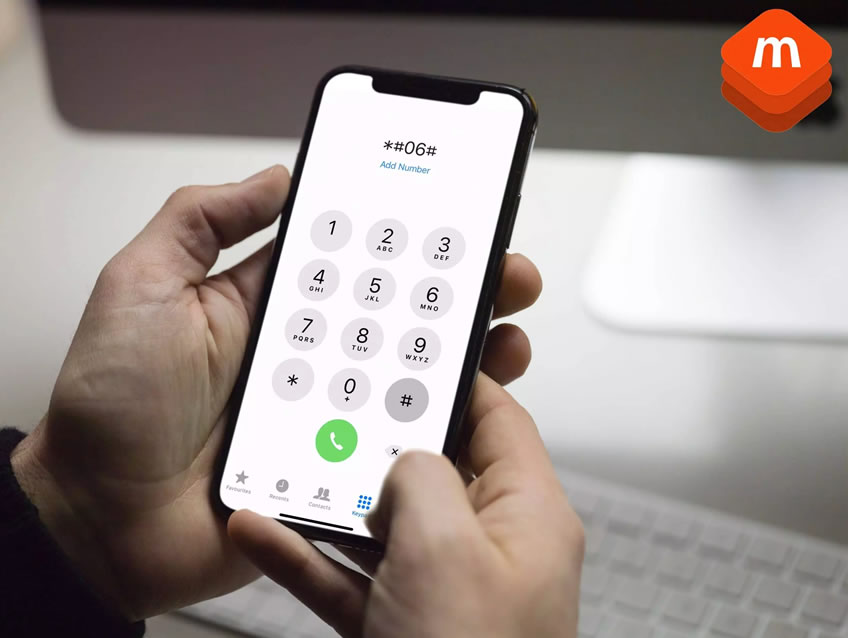
Every mobile phone has a unique IMEI number. This number helps identify the device and can support checks for important details such as the make, model, blacklist status and whether someone has reported the phone lost or stolen.
If you buy, sell, recycle or process used phones, an IMEI check can help you spot risk before you make a decision. This guide explains what an IMEI number can show, how to find it, and why businesses use IMEI checks as part of used-device due diligence.
An IMEI number can help identify a mobile device. Depending on the checking service used, it may show the make, model, device type, network status, blacklist status, lost or stolen reports, insurance-related flags and other device-status information.
Consumers can use this information before buying a second-hand phone. Businesses such as recyclers, resellers, insurers and mobile networks can use IMEI checks before they buy, grade, repair, insure, recycle or resell a handset.
Businesses that need to check devices at scale can use MobiCHECK IMEI check software to support lost, stolen, blacklisted and high-risk device checks.
IMEI stands for International Mobile Equipment Identity. It is a unique number linked to a mobile device. In simple terms, it works like an identity number for the handset itself.
The IMEI is separate from the phone number, SIM card, Apple ID, Google account and personal data stored on the phone. It identifies the device hardware, not the person using it.
A serial number mainly helps the manufacturer identify the device. It can support repairs, warranty checks and service records. You can usually find the serial number in the phone’s settings, on the SIM tray or, on some older models, on the back of the device.
An IMEI number goes further because mobile networks and trusted checking services can use it to check device status. For example, an IMEI lookup can help show whether a phone has been reported lost, stolen, blacklisted or barred from network use.
If a recycler processes a used phone with MobiCHECK, the IMEI lookup can help flag risk before the handset moves further through the resale process.
The quickest way to find your IMEI number works on most iPhone and Android devices. Open the phone app and enter *#06# on the keypad. The IMEI number should then appear on the screen.
You can also find the IMEI number through the phone settings.
Some older iPhone models also show the IMEI on the back cover or on the SIM tray.
Android menus vary by manufacturer, so Samsung, Google, Motorola and other devices may use slightly different wording.
No. An IMEI number identifies the phone, not the owner. It does not normally reveal a person’s name, address, photos, messages, emails or contacts.
However, you should still treat an IMEI carefully. A trusted checking service can use it to look up device-status information, including whether the phone has been reported lost, stolen, blacklisted or barred.
The information you can find from an IMEI number depends on the checking service and the data sources behind it. A basic lookup may confirm the make and model. A more complete check can help identify commercial and resale risk.
An IMEI check may help confirm:
MobiCode builds its MobiCHECK device check around IMEI lookup data and combines that with wider device intelligence to support clearer used-phone decisions.
Yes, an IMEI check can help identify whether someone has reported a phone lost or stolen. The result depends on the databases and sources used by the checking provider.
This matters because a stolen phone may later become blocked or blacklisted. That can make the device unsuitable for normal resale and create risk for the buyer, recycler or reseller.
Yes. An IMEI check can help show whether a network has blacklisted or barred a phone. Networks may blacklist phones after lost or stolen reports, insurance claims or other account and network issues.
Businesses that buy or handle used phones should check blacklist status before purchase. This reduces the risk of accepting devices that cannot be safely or commercially resold.
A used phone can look fine and still carry hidden risk. It may switch on, connect to Wi-Fi and appear normal, but later show issues linked to blacklist status, lost or stolen reports, finance, insurance or network restrictions.
For single-device checks, users can visit MyMobiCheck to run an instant consumer IMEI check.
Businesses that handle used mobile devices need quick, reliable ways to check risk. Recyclers, refurbishers, resellers, insurers and networks all need to understand the status of a handset before making a commercial decision.
A proper IMEI check helps reduce the chance of buying, processing or reselling phones that are stolen, blacklisted, financed, blocked, claimed against or otherwise unsuitable for resale.
MobiCHECK supports deeper used-device due diligence. MobiTEST supports mobile phone diagnostics, and MobiWIPE supports certified mobile data erasure.
Together, these tools help businesses check device history, test handset condition and remove data before resale or recycling.
Quick answers to common questions about IMEI numbers, stolen phone checks, blacklisted devices and business IMEI due diligence.
An IMEI number can help identify a device. It may also support checks for make, model, blacklist status, lost or stolen reports, network bars and other device-status information.
No. An IMEI number identifies the device rather than the person using it. It does not normally reveal the owner’s name, address, messages, photos or personal accounts.
Yes, an IMEI check can help identify whether someone has reported a phone lost or stolen, depending on the data sources used by the checking provider.
Yes. An IMEI check can help show whether a network has blacklisted or barred a phone.
Recyclers and resellers check IMEI numbers to reduce the risk of buying or selling phones that are stolen, blacklisted, blocked, financed or unsuitable for resale.
Yes. Businesses that process large numbers of devices can use IMEI check software such as MobiCHECK to support bulk checks, reporting and used-device due diligence workflows.

Copyright © 2024 · All Rights Reserved · MobiCode